How to install APC in centos for PHP better performance ( opcode)

APC for PHP better performance:

APC is a op-code caching for PHP. Once PHP code is run, APC caches the complied PHP code so for next time, time for compiling PHP will be reduce and gives faster performance.  APC caches files in memory so  performance of PHP code improves significantly.

Installing APC:

Make sure PHP is installed first 🙂 . we need to install few pre-requist for PHP.

$ yum install php-pear php-devel httpd-devel pcre-devel gcc make

$ pecl install apc


Configuring APC:

Open APC config file and make sure you have atlest following configuration:

vi /etc/php.d/apc.ini

Enable APC for php.

 extension=apc.so
 apc.enabled=1

The number of seconds a cache entry is allowed to idle in a slot before APC dumps the cache.

 apc.ttl=72000
 apc.user_ttl=72000
 apc.gc_ttl=3600

Size of memory for apc ( 1024 M)

apc.shm_size=1024M

Enable apc stats.

apc.stat=1

Enable APC for command line php operations.

apc.enable_cli=1

Allow 2 seconds after a file is created before it is cached. This will prevent premature PHP pages to get cached.

apc.file_update_protection=2

Maximum size of single file that apc can store.

apc.max_file_size=1M

Maximum number of files APC can store ( rotation).

apc.num_files_hint=200000

Maximum number of users data entries that APC can store.

apc.user_entries_hint=20000


You can put your configuration in php.ini file but i prefer to have separate file like above for configuration. Values mentioned above are for demonstration purpose, different values  for APC can be set  which depends on number of PHP pages, size of memory in server, number of page hits e.t.c

Restart httpd server:

service httpd restart


APC installation comes with apc.php file, which can be use to monitor APC performance. This file can be found inside APC package  OR can be download from http://pecl.php.net/package/APC ( unzip and look for apc.php file).

Once apc.php is downloaded copy it to your domain so that you can assess it.

Now from browser, you can go to  http://domain.com/apc.php. I prefer to wait for a day to see the APC performance so we can have clear idea how well our configuration did.


Sample output of APC:
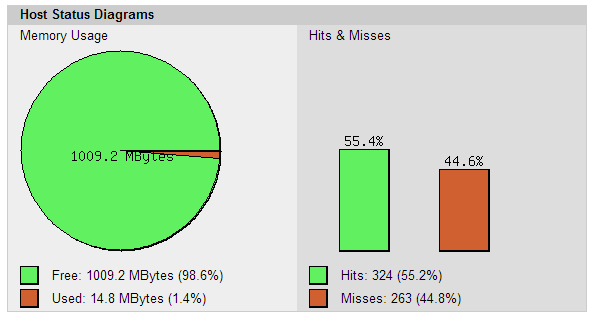
apc1
Here, we clearly see that APC is not performing very well as we have 44% misses. To optimize this we can reduce the memory and also we can increase max_file_size and also TTL time so that more can be cached in APC.  Normally when missed rate is more than 10% ,  its better to reconfigure the settings of APC.

Well tuned APC will look like below: 

APC INFO  luke.savvysme.com.au   128.199.188.56-s


Virtualmin – upgrate PHP 5.3 to PHP 5.4 / PHP 5.5 or higher version from Yum

Upgrade PHP 5.3 default version in Virtualmin / webmin to PHP 5.3 / php 5.5 in Centos:

Virtualmin / webmin comes with default php5.3 version while higher version is only available in pro version. This article helps how to update php versions  to higher version like php5.5.


Step 1:  Install PHP version:

For centos 6:

rpm -Uvh http://mirror.webtatic.com/yum/el6/latest.rpm

For centos 5:

rpm -Uvh http://mirror.webtatic.com/yum/el5/latest.rpm

Now install php by:

To install php 5.4 version:

yum install php54w php54w-common php54w-mysql php54-mbstring

To install php 5.5 version

yum install php55w php55w-opcache php55w-common php55w-mysql php55-mbstring

More module can be added by simple apending the module name at the end of yum or can be installed sepereatly.

List of modules are:

Package Provides
php54w mod_php, php54w-zts
php54w-bcmath
php54w-cli php-cgi, php-pcntl, php-readline
php54w-common php-api, php-bz2, php-calendar, php-ctype, php-curl, php-date, php-exif, php-fileinfo, php-ftp, php-gettext, php-gmp, php-hash, php-iconv, php-json, php-libxml, php-openssl, php-pcre, php-pecl-Fileinfo, php-pecl-phar, php-pecl-zip, php-reflection, php-session, php-shmop, php-simplexml, php-sockets, php-spl, php-tokenizer, php-zend-abi, php-zip, php-zlib
php54w-dba
php54w-devel
php54w-embedded php-embedded-devel
php54w-enchant
php54w-fpm
php54w-gd
php54w-imap
php54w-interbase php_database, php-firebird
php54w-intl
php54w-ldap
php54w-mbstring
php54w-mcrypt
php54w-mssql
php54w-mysql php-mysqli, php_database
php54w-mysqlnd php-mysqli, php_database
php54w-odbc php-pdo_odbc, php_database
php54w-pdo
php54w-pecl-apc
php54w-pecl-memcache
php54w-pecl-zendopcache
php54w-pecl-xdebug
php54w-pgsql php-pdo_pgsql, php_database
php54w-process php-posix, php-sysvmsg, php-sysvsem, php-sysvshm
php54w-pspell
php54w-recode
php54w-snmp
php54w-soap
php54w-tidy
php54w-xml php-dom, php-domxml, php-wddx, php-xsl
php54w-xmlrpc

Each module can be configured with ini files which are inside /etc/php.d/<module name>.ini

Here we are installing php 5.5 so in above module we replace php54w with php55w . example , php54w-mysql will be php55w-mysql in php 5.5

Step 2: setup PHP 5.5 version in apache

a) Create cgi file < if using php-cgi)

Go to your domain name:

/home/<username>/cgi-bin/

Copy existing cgi file lets say 5.4.cgi to new version cgi, in this case 5.5.cgi

cd /home/<username>/cgi-bin/
cp php5.4.cgi php5.5.cgi

edit cgi file

vi php.5.5.cgi

and replace with

#!/bin/bash
 PHPRC=$DOCUMENT_ROOT/../etc/php5 # your php version
 export PHPRC
 umask 022
 if [ "$REDIRECT_URL" != "" ]; then
 SCRIPT_NAME=$REDIRECT_URL
 export SCRIPT_NAME
 fi
 SCRIPT_FILENAME=$PATH_TRANSLATED
 export SCRIPT_FILENAME
 exec /usr/bin/php-cgi  # path of php-cgi


Give proper permission to your cgi files by:

chown <username>:<username> php5.5.cgi
chmod +x php5.5.cgi

b) create new PHP 5.5 fcgi file ( if using fcgi php)

go to

cd /home/<username>/fcgi-bin/

copy existing fcgi file to new php5.5 fcgi

cp php5.fcgi php5.5.fcgi

vi php5.5.fcgi

replace with following

#!/bin/bash
 PHPRC=$PWD/../etc/php5
 export PHPRC
 umask 022
 export PHP_FCGI_CHILDREN
 PHP_FCGI_MAX_REQUESTS=99999
 export PHP_FCGI_MAX_REQUESTS
 SCRIPT_FILENAME=$PATH_TRANSLATED
 export SCRIPT_FILENAME
 exec /usr/bin/php-cgi


Give proper permission to your cgi files by:

chown <username>:<username> php5.5.fcgi
chmod +x php5.5fcgi


c) Change path toPHP 5.5 cgi in apache httd.

Now final step is to edit apache httpd file to point to new version of php.

vi /etc/httpd/conf/httpd.conf

go to your domain virtual hosting settings.

i) For fcgi based domain

Remove current FCGIWrapper and replace with following :

FCGIWrapper /home/<username>/fcgi-bin/php5.5.fcgi .php


ii) For cgi based domain

Remove existing Action and AddType and replace with follows:

Action application/x-httpd-php5.5 /cgi-bin/php5.5.cgi
 AddType application/x-httpd-php5.5 .php


3) Step 3:  Restart apache server:

service httpd restart.